

How to Simplify Product Listing on Wayfair with Feed Files? A Comprehensive Guide for Sellers
Updated 8 min read StaffCloud
Short answer: to list products on Wayfair in bulk, go to Product Management › Add New Products in Wayfair Partner Home and choose Quick Upload. Download the product addition template for your product class, fill in every required field (identifiers, specs, images, copy), and upload the .xlsx file. Then use My Uploads to download the error file, fix what's flagged, and re-upload until every product shows as Ready and is submitted.
Wayfair is one of the largest online marketplaces for furniture, décor and home goods. Its catalogue is also one of the most detailed to list into: every product class has its own specs, and Wayfair builds its product pages from the data you supply. Adding products one at a time works for a handful of SKUs. For anything bigger, a spreadsheet feed file is the faster and more reliable route. This guide walks through the feed-file process in Partner Home, the data and imagery you need, how to read upload errors, and what Wayfair is changing in its catalogue tools.
What is a Wayfair feed file?
A feed file is a spreadsheet template, downloaded from Partner Home, that holds the product data for many SKUs at once. Wayfair's own seller guidance describes it as uploading "product information like product identifiers, specs and bundling info, as well as … product details and descriptions, images, videos and guides" in one go, including class-specific details for several product classes in a single file.
Wayfair offers three broad ways to add products:
| Method | Best for | How it works |
| Quick Upload (feed file) | Most sellers; anything from a few to thousands of SKUs | Download a class-specific .xlsx template, fill it in, upload it in Partner Home |
| Guided Upload | A small number of products, or sellers new to Wayfair | Step-by-step forms in Partner Home, one product at a time |
| API integration | Large catalogues managed from a PIM or ERP | Product data sent through Wayfair's supplier API or a connected channel tool |
Templates from Guided Upload can't be used in Quick Upload, so pick one route per batch.
Before you start: the data you need
Most upload errors come from missing data, not from the spreadsheet. Wayfair's seller guidance lists what to gather before building your catalogue:
- Product identifiers: model numbers, brand names, product names, pricing and UPC/EAN codes
- Specs and bundling info: carton quantities, collections, weights and dimensions
- Features and materials, answered through Wayfair's class-specific spec questions (these drive the filters shoppers use)
- Compliance details and certifications, including any of the third-party sustainability certifications Wayfair accepts for its Shop Sustainably programme
- Content and media: marketing copy, feature bullets, images, and where available videos, assembly guides and digital swatches
Collect this in your own master sheet first. Copying clean data into Wayfair's template is far quicker than chasing missing weights or UPCs mid-upload.
Step by step: listing products with Quick Upload
Screenshots are from an earlier version of Partner Home. Labels and layout may differ slightly in your account, but the steps are the same.
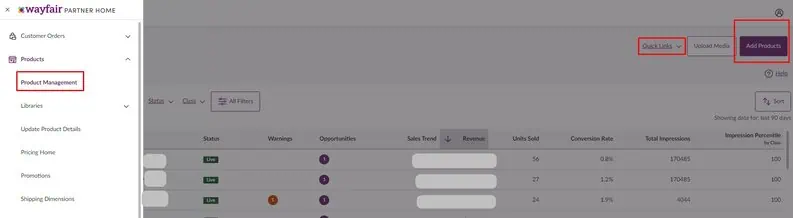
1. Select "Add New Products"
In Partner Home, go to Product Management in the menu and click Add New Products. You can also start from the Partner Dashboard: under Quick Links, choose Add New Products.
2. Choose "Quick Upload"
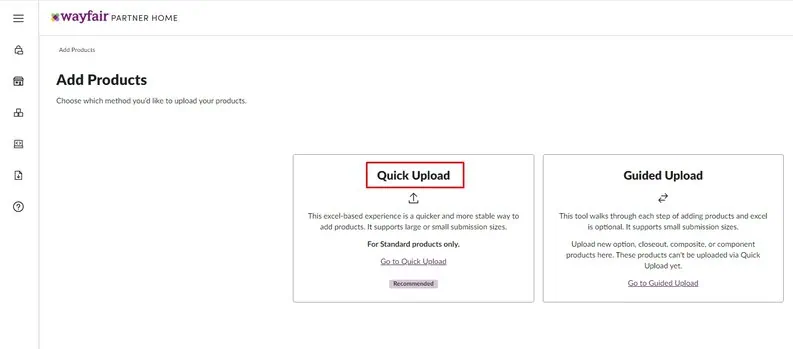
Quick Upload is Wayfair's bulk spreadsheet tool. It lets you:
- Add many products from a single spreadsheet
- Keep working elsewhere in Partner Home while the upload processes
- Review errors in a copy of your own spreadsheet
- Submit products individually as each one is ready, without waiting for the whole file to be perfect
3. Download the product addition template
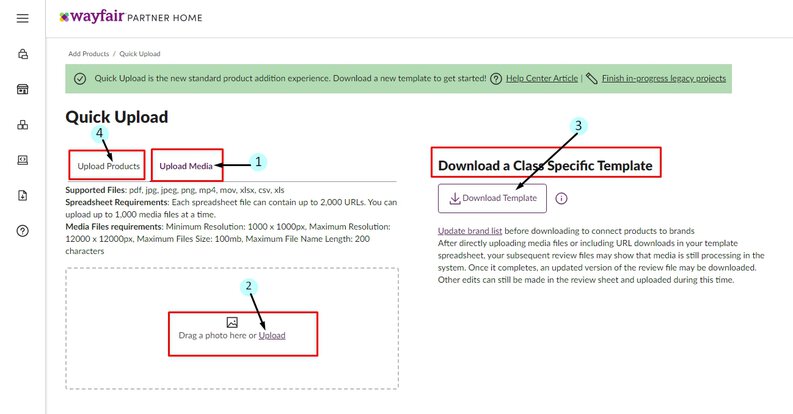
- Click the Download Template box.
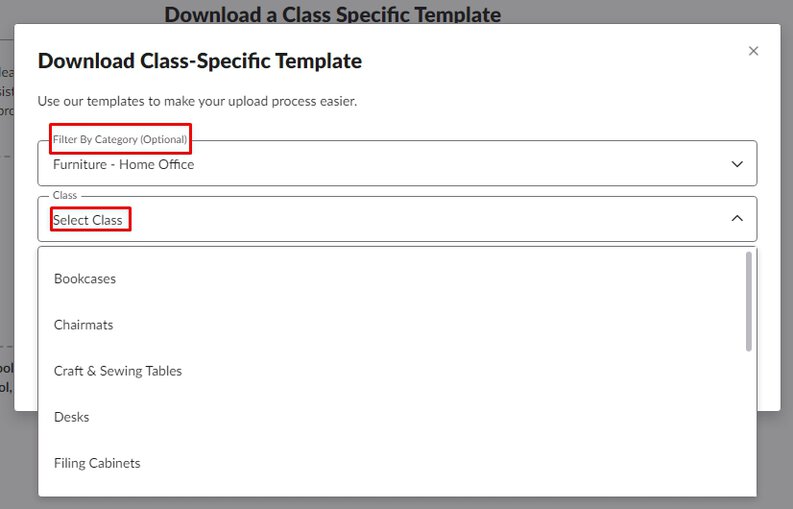
- In the pop-up, select the category (optional) and the class (required). The class determines which spec fields appear in the template and where your product sits on Wayfair, so choose the most specific one that fits.
- Click Add Selected Class. Repeat if the batch covers several classes.
- Click Download to get your product addition template.
Read the instructions tab inside the template before you start. It explains each column and the accepted values, and it is the most reliable reference for the current file limits.
4. Fill in the template
The template groups fields into Required, Conditional (required only when another answer makes them relevant) and Additional. Leave no required field blank. Fill in the conditional and additional fields too wherever you have the data. They power Wayfair's filters and product page details, and richer listings generally perform better.
Add product media in one of two ways:
- Direct upload: upload image files through the Upload Media function and let Wayfair link them to products.
- Image URLs in the template: paste publicly accessible image URLs into the designated media columns.
5. Upload the file
- Save as .xlsx, the supported format.
- Drag and drop the file, or select it, in Quick Upload.
- Media may show as "processing" at first. Wayfair makes an updated review file available once processing finishes, and you can keep editing while it runs.
Wayfair SKU types
A SKU (stock keeping unit) is Wayfair's unique identifier for a product. Getting the SKU type right matters most for furniture and anything sold in parts:
| SKU type | What it means | Example |
| Standalone product | Sold on its own, never as part of a composite | A light fixture |
| Composite | Made up of several components, each with its own part number and fulfilment information | A bed |
| Sellable component | Sold alone and as part of a composite | A headboard also sold separately |
| True component | Can only be sold as part of a composite | Bed rails |
Composites are the most error-prone part of a Wayfair upload. Map every component, with its own weight, dimensions and carton count, before you build the template.
Image requirements
Imagery is what makes a Wayfair listing sell, and weak imagery is a common cause of returns. Wayfair's published guidance:
- Resolution: at least 1,000 × 1,000 pixels to be featured, with 2,000 × 2,000 recommended to show detail.
- Quantity: Wayfair recommends at least three images to start, and more to stand out.
- Mix of shot types: a single-product silhouette ("silo") on a plain background, plus zoomed-in and zoomed-out environmental shots, functional shots and dimensional shots.
- Size and function: show how big the product is and anything that opens, moves or folds.
- Supplemental media: videos, assembly guides and digital swatches (detailed close-ups of fabric or finish) all help shoppers who can't touch the product.
Reading your upload status and fixing errors
Open My Uploads to see your upload history. Each upload shows how many products fall into each status:
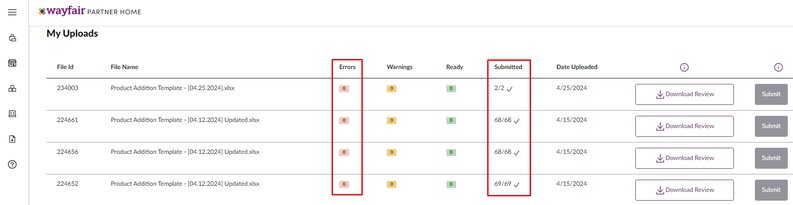
| Status | Meaning | What to do |
| Errors | Critical issues that block the product | Download the error file, correct the flagged cells, re-upload |
| Warnings | Non-blocking suggestions | Fix where you can. Warnings often point to missing optional data that improves the listing |
| Ready | No issues, ready to submit | Submit |
| Submitted | Sent to Wayfair for processing | Monitor until the product goes live |
The page also shows the date uploaded and any auto-linked media (images Wayfair matched to products automatically).
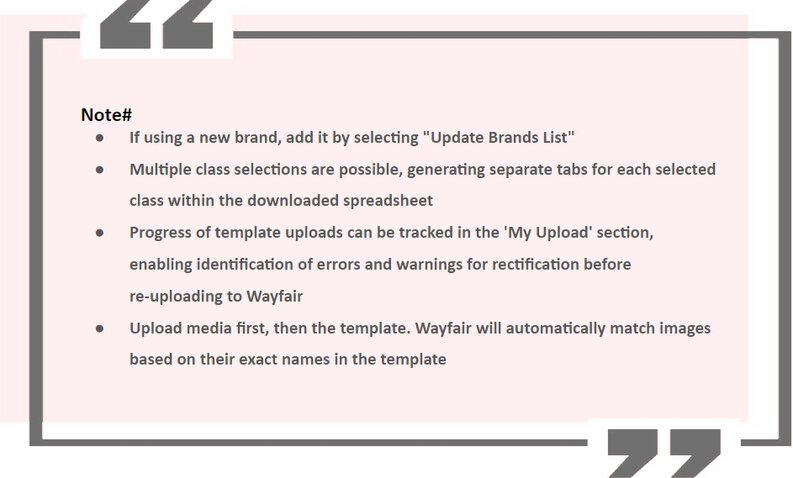
Work in the downloaded error file rather than your original. It keeps Wayfair's column layout and highlights exactly which cells failed. Fix, re-upload, and repeat until nothing is left in Errors.
Editing products you've already listed
Feed files aren't only for new products. Wayfair's updated product management tools in Partner Home let suppliers edit key details in bulk through spreadsheets, including product names, feature bullets, marketing copy and attributes. Changes can be applied from one part to every part within a SKU. The Product Merchandising Page lets you view and edit individual parts and their parent SKU in one place, and an audit log records who changed a product name and when.
What's changing in Partner Home
Wayfair has announced a redesigned product addition experience. It promises faster speed to launch, real-time validation inside the Excel templates (so errors are caught before you submit), better support for composites, option groups, fulfilment-only SKUs and replacement parts, and a Catalog Health summary that flags products at risk of takedown or missing attributes. Rollout may differ between accounts, so if your Partner Home looks different from the screenshots above, follow the template's own instructions tab.
Common mistakes
- Choosing a broad class. The class decides which specs you're asked for and where the product appears. A vague class means missing filters and weaker placement.
- Blank required or conditional fields. These are the most common cause of errors. Build your master data before you open the template.
- Low-resolution or single images. Images under 1,000 × 1,000 px won't be featured, and one image rarely converts.
- Image URLs that aren't public. Wayfair has to be able to download every URL. Links behind a login or that expire will fail.
- Mixing up composites and components. A true component entered as a standalone product causes fulfilment and display problems later.
- Re-uploading the original file instead of the error file. You lose the highlighted errors and risk re-introducing fixed problems.
Frequently asked questions
How do I bulk upload products to Wayfair?
In Partner Home, go to Product Management › Add New Products › Quick Upload. Download the template for your product class, fill it in, and upload the .xlsx file. Then fix any errors flagged in My Uploads and submit.
What file format does Wayfair accept for product uploads?
Quick Upload uses Wayfair's own Excel template in .xlsx format, downloaded for the classes you select. Check the template's instructions tab for the current limits on products and classes per file.
What are Wayfair's image size requirements?
At least 1,000 × 1,000 pixels to be featured, with 2,000 × 2,000 recommended. Wayfair recommends at least three images per product, mixing silhouette and environmental shots.
Can I edit existing Wayfair listings in bulk?
Yes. Partner Home's product management tools let you bulk-edit product names, feature bullets, marketing copy and attributes through spreadsheets.
What is the difference between a composite and a component on Wayfair?
A composite is a product made of several parts, like a bed. A true component, like bed rails, can only be sold as part of a composite. A sellable component, like a headboard, can be sold both alone and within a composite.
How StaffCloud helps
Our marketplace teams create and maintain Wayfair listings for brands and sellers. That includes building feed files, uploading media, working through error files, and keeping product content current to Wayfair's requirements. See our Wayfair, Etsy and Target management and product data and catalogue management services. If deductions are the issue, read our guide on disputing Wayfair deductions. Or email support@staffcloud.net or submit an enquiry.
Related services
- eCommerce Multi-Marketplace Management Services Walmart, eBay, Wayfair, Target and the channel tools that keep them in sync. Explore service
- eCommerce Retail Systems & EDI Integrations Retailer portals, EDI, ERP and the disputes that come out of them. Explore service
- eCommerce Product Data & Catalog Management Attributes, matching, pricing compliance and catalogue syndication. Explore service
More articles in eCommerce Platforms
-
 28 May 2024
How to Submit a Dispute for Deduction on Wayfair?
Deductions are credit requests from Wayfair to the sellers for imperfect order conditions.
-
 20 May 2024
How to list your products in bulk on Walmart?
Walmart Marketplace is a fast-growing e-commerce platform, similar to Amazon, where third-party sellers and wholesalers
-
 7 July 2025
How to Scale Multichannel E‑commerce with ChannelEngine?
In the current e-commerce environment, expanding your reach across multiple marketplaces is no longer a choice—it's a