
How to Dispute Deductions on Lowe’s: A Supplier’s Guide
Updated 8 min read StaffCloud
Short answer: Lowe's suppliers dispute deductions in Vendor Gateway › Applications › Vendor Inquiry, on the Deductions tab. Open the deduction, tick the lines you're disputing in its Chargeback section, enter the amount and a reason, attach proof (POD, price sheet, ASN), and submit. Lowe's calls a dispute a "chargeback". Compliance fines for On Time, Fill Rate and ASN are handled separately as rebuttals in the Vendor Compliance System, and only between the 2nd and 16th of each month.
This guide is for suppliers selling to Lowe's. If you're a customer looking to dispute a refund, contact Lowe's customer care instead.
Deductions are amounts Lowe's withholds from a supplier's payment because of a shortage, a price mismatch, a return or a compliance failure. Not every deduction is valid. Lowe's has a dispute process built into its supplier portal so you can recover the ones that aren't. The money is only recovered if you find the deduction, choose the right reason, attach the right evidence and do it inside the window. This guide covers each of those steps, based on how the portal works in 2026.
Where Lowe's deductions appear
Almost everything between Lowe's and its suppliers runs through Lowe's Vendor Gateway. Deductions live in the Vendor Inquiry app (Applications › Vendor Inquiry; older menus list it under Finance & Accounting), which has four tabs:
| Tab | What it holds |
| Checks | Payments from the last five years. Click a check number to see every invoice and deduction it covered |
| Invoices | All invoices, filterable by status (Setup, Paid) or type (Problem, EDI 810 Rejections) |
| Deductions | Negative invoices with a deduction number, about three years of history, filterable by type (Standard or Return to Manufacturer) and status |
| RTM Allowances | Return-to-manufacturer allowance details |
Two things catch suppliers out:
- Vendor Gateway works per Vendor Business Unit (VBU). Disputes are filed at VBU level, so if you supply Lowe's under more than one vendor number, switch VBU and check each one.
- Date filters default to a short range. Widen the dates or older deductions will look as if they don't exist.
A reliable way to work is to start from the latest check. Its invoice list shows every deduction taken from that payment as a negative amount, and the "invoice number" is the deduction number (DM sequence). You can export that list and search each deduction in the Deductions tab, which makes the deduction type much clearer than browsing the Deductions list directly.
Common Lowe's deduction types
The tracking code on each deduction tells you what it's for. The ones suppliers see most:
| Deduction | Tracking code | Typical cause | Evidence that wins disputes |
| Shortage (stock or special-order) | DT | Lowe's received fewer units than invoiced | Signed POD / POPU, ASN, pallet breakdown, packing list |
| Cost difference | PRC | Invoice price doesn't match Lowe's cost | Current price sheet or cost agreement |
| Return to Manufacturer | RTM | Defective or non-defective product returned (or deducted as returned) | Return tracking, proof of receipt or non-receipt, your RTV agreement |
| Freight and routing violations | CAP, FPD, TRF | Routing guide not followed, freight on returns | Carrier booking, routing instructions, BOL |
| Labour charges | DST | Extra handling at the DC or store | Shipment and labelling records |
| Compliance deduction | VLS | Monthly On Time, Fill Rate or ASN fines | Best disputed earlier, as a VCS rebuttal (see below) |
| Allowances | PAC, REC, CPG, AWY, M20, 6NO | Marketing and infrastructure programmes | Your signed allowance agreement; ask Lowe's for line detail via a ticket |
| Audit claim | AUD | Post-audit recovery | Invoices, agreements and payment history |
Codes are as documented in SPS Commerce's guide to Lowe's deduction codes. Lowe's can change them, so if you see one you don't recognise, ask through a Vendor Gateway ticket.
How to dispute a standard deduction
- Open the deduction. In Vendor Inquiry › Deductions, click the deduction number. The detail page shows the tracking number, deduction date and amount, invoice, location, PO and freight type, plus any Lowe's comments. Read the comments, which often explain the deduction.
- Select the lines. In the Chargeback section, tick each line you're disputing. Shortage and pricing deductions show item-level lines (Lowe's quantity vs vendor quantity, Lowe's cost vs vendor cost). Most other deductions have a single line.
- Enter the amount and reason for each line. Pick the reason that matches your evidence, for example Price Sheet and POD/POPU Attached, Display QTY – POD Attached or Display PRC – Price Sheet Attached. Use Other only with a clear comment.
- Add comments and contact details. One or two sentences that connect the evidence to the amount ("POD shows 40 cartons received against ASN for 40; shortage of 6 not supported").
- Attach the evidence. Up to 5 files, each between 3 KB and 3 MB, in PDF, DOC/DOCX, XLS/XLSX, JPG or TIFF.
- Submit, and save copies of everything you attached. Attachments disappear from the dispute once it's sent.
Disputing Return to Manufacturer (RTM) deductions
Return to Manufacturer deductions cover items returned to the vendor (RTV), defective or non-defective, under the return policy agreed during onboarding or maintenance. If the returned package actually reached you, there's nothing to dispute. If it never arrived, or was disposed of, the deduction should be disputed.
- Log in to Lowe's Vendor Gateway and open Vendor Inquiry.
- On the Deductions tab, choose Return To Manufacturer as the deduction type.

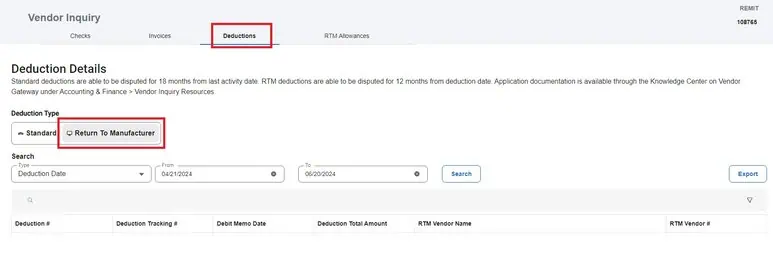
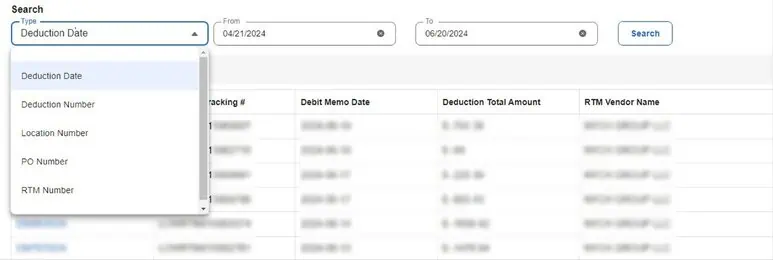
- Search by date, or switch the search to Deduction Number, Location Number, PO Number or RTM Number.
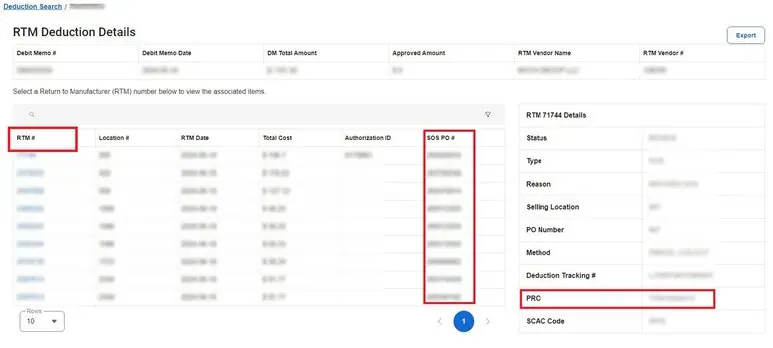
- Click the deduction number for its details. One deduction can cover several POs.
- Open each RTM number and note the PRO (carrier tracking) details.
- For drop-ship orders, look up return tracking by PO in CommerceHub (now part of Rithum), or in your carrier's portal.
- Check whether the package reached your returns location:
- Delivered to you: no dispute needed.
- Not returned, or no return tracking: dispute it, typically with the reason Policy not Followed – Vendor Agreement attached, and attach your RTV agreement.
- Disposed of: dispute with the same reason.
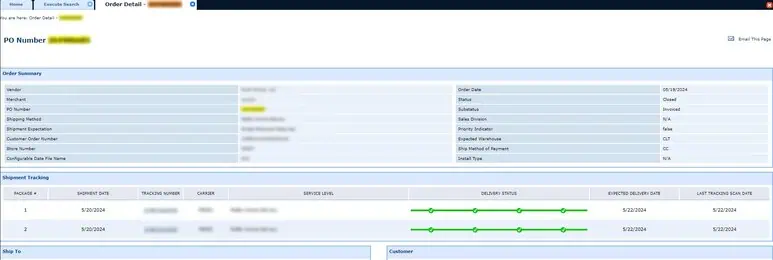
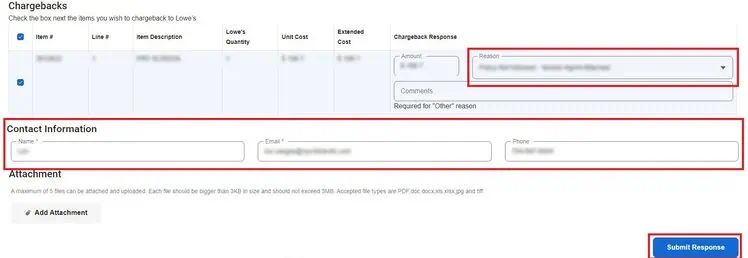
Complete the contact name, email and phone fields, then click Submit Response.
Compliance fines: On Time, Fill Rate and ASN
Lowe's calls compliance Vendor Performance. Fines are tracked in the Vendor Compliance System (VCS) app in Vendor Gateway, and disputes there are called rebuttals. SPS Commerce's Lowe's compliance guide (updated 2026) lists the standards as:
| Measure | Target | Fine on non-compliance |
| On Time | 95% | 10% of the PO value |
| Fill Rate | 98% | 10% of the shorted quantity's value |
| ASN | 100% | $250 per non-compliant ASN |
Key rules to work to:
- The rebuttal window is the 2nd to the 16th of each month, for the previous month's fines. Miss it and the fines are deducted as one lump compliance deduction, which is much harder to win back.
- VCS measures against the original ship date and order quantity. Later adjustments don't show, so keep the evidence for any change Lowe's agreed.
- A missing ASN can't be rebutted. If the ASN wasn't received, or was rejected and not resubmitted, before the goods arrived, the fine is non-disputable.
- Choose the correct reason code and attach the documents it calls for. Like deductions, a rebuttal can't be reopened once submitted.
Standards and fine amounts can change. Check the current Vendor Performance documents in Vendor Gateway's Knowledge Center, or with your Lowe's contact.
Dispute time limits
| What | Window |
| Standard deductions | Vendor Inquiry states up to 18 months, but some Lowe's Knowledge Center documents say 12. Treat 12 months as your deadline. |
| Compliance fines (VCS rebuttals) | 2nd–16th of the month following the fine |
| Problem invoices | Visible in the Vendor status for about 120 days, so fix them promptly |
The safest habit is a weekly deduction review rather than a quarterly clean-up. Evidence such as PODs and carrier records is far easier to get while it's recent.
After you submit: statuses, approvals and re-disputes
- Vendor: right after you submit.
- Lowe's: usually about a day later, while it waits for Lowe's review. You can filter the Deductions tab by this status.
- Resolved: Lowe's has decided. A positive figure in the Approved field means money is coming back; $0 means denied.
The re-dispute rules matter. A denied line can be disputed again, as often as needed, until it is resolved, as long as you're still inside the window. Re-attach your documents each time, because they're removed after a denial, and add anything Lowe's asked for, often a pallet breakdown. A partially approved line can't be re-disputed for the remainder, and once a dispute is resolved it's closed for good. So send a complete dispute the first time.
Overages show as positive amounts on a deduction line and can't be disputed in the app. Dispute the full value of the negative lines.
To track payments of disputed invoices, open the Invoices tab in Vendor Inquiry and filter by Paid.
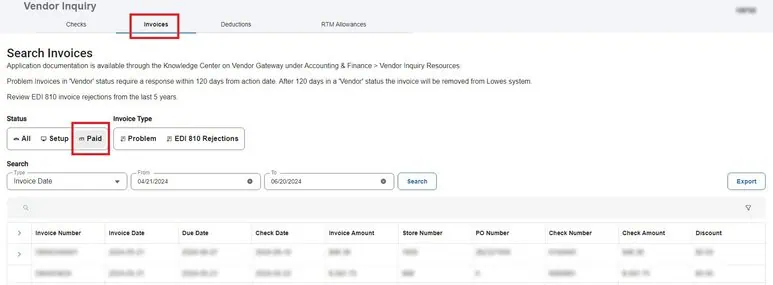
For anything the dispute screen can't handle, such as allowance line details or an unknown code, raise a ticket under Vendor Gateway's Ticket Management tab. Choose the closest help topic (for example Accounting & Finance or Return To Vendor/Buybacks) and attach the deduction details.
How to prevent Lowe's deductions
- Send accurate ASNs before the goods arrive: right quantities and, for prepaid vendors, an arrival date within a day of the actual one.
- Ship to the original dates and quantities, or get changes agreed in writing.
- Keep cost files in sync. A price change that hasn't reached Lowe's systems turns into cost-difference deductions on every invoice.
- Capture signed PODs and pallet counts for every shipment, and store them where your AR team can find them by PO.
- Mark discontinued or out-of-stock items unavailable promptly, so special-order POs aren't placed and then shorted.
- Follow the routing guide for every collect shipment.
Frequently asked questions
Where do I dispute deductions with Lowe's?
In Lowe's Vendor Gateway, open Applications › Vendor Inquiry, go to the Deductions tab, open the deduction and complete its Chargeback section. Compliance fines are rebutted separately in the Vendor Compliance System.
How long do I have to dispute a Lowe's deduction?
Vendor Inquiry states up to 18 months for standard deductions, but some Lowe's documents say 12, so treat 12 months as the limit. Compliance fines must be rebutted between the 2nd and 16th of the following month.
What does "chargeback" mean at Lowe's?
At Lowe's, a chargeback is your dispute of a deduction. That's the opposite of many retailers, where a chargeback is the fine itself.
What documents should I attach to a Lowe's shortage dispute?
The signed proof of delivery or pickup, the ASN, the packing list and a pallet breakdown. Add the price sheet for cost differences. You can attach up to five files of 3 MB each.
Can I re-dispute a denied Lowe's deduction?
Yes, a fully denied line can be disputed again within the window, with the documents re-attached. Partially approved and resolved lines can't be re-disputed.
How StaffCloud helps
Managing retailer deductions takes steady, detailed work: reviewing remittances, matching deductions to PODs and price sheets, filing disputes inside the window and following them through to payment. StaffCloud supports suppliers with deduction investigation, dispute filing and tracking across retailer portals including Lowe's, and helps keep the supporting documentation up to date. See our retail systems and EDI and invoice, PO and remittance processing services, our guides to Home Depot POD disputes and Wayfair deduction disputes, or email support@staffcloud.net.
Related services
- eCommerce Retail Systems & EDI Integrations Retailer portals, EDI, ERP and the disputes that come out of them. Explore service
- eCommerce Order & Fulfillment Operations From purchase order to tracking number, across every channel you sell on. Explore service
- eCommerce Multi-Marketplace Management Services Walmart, eBay, Wayfair, Target and the channel tools that keep them in sync. Explore service
More articles in eCommerce Platforms
-
 27 June 2024
How to submit POD Dispute on ‘The Home Depot’?
Home Depot, a prominent retailer in home improvement, provides an extensive array of products and services catering to b
-
 28 May 2024
How to Submit a Dispute for Deduction on Wayfair?
Deductions are credit requests from Wayfair to the sellers for imperfect order conditions.
-
 20 June 2024
How to do Invoicing on SPS Commerce?
SPS Commerce provides streamlined cloud-based supply chain solutions, encompassing electronic data integration (EDI) sys